No Ads · Android

GeekFlight

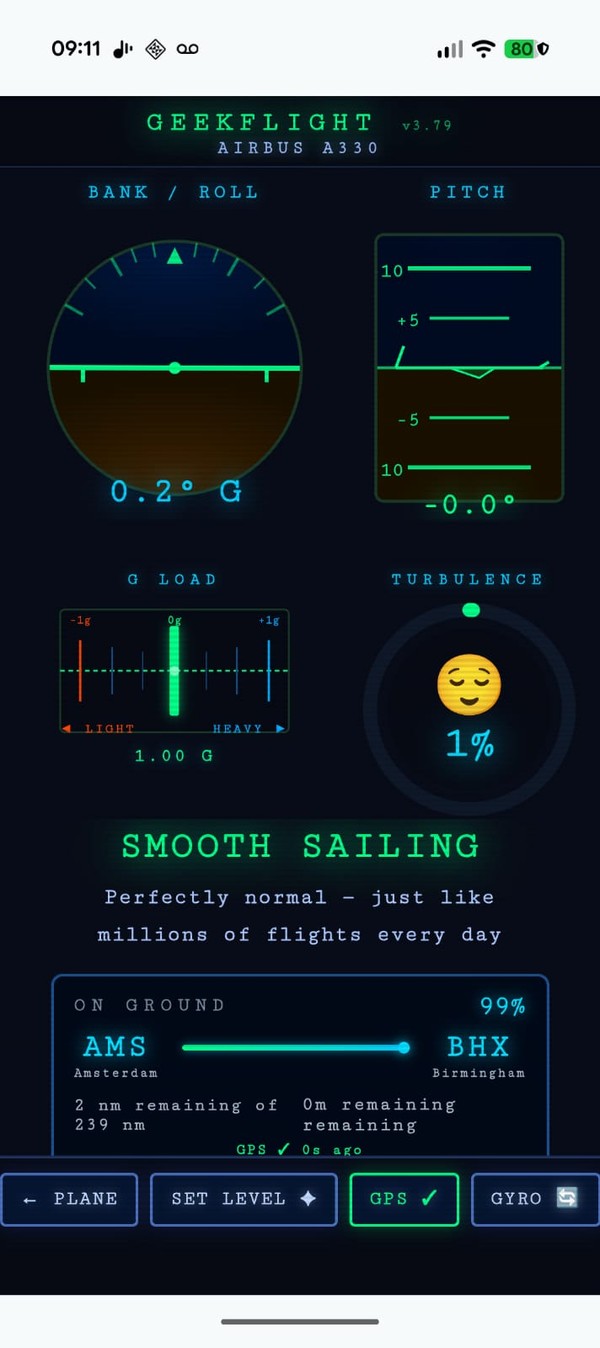
Real-time aviation instruments on your Android phone. Bank angle, turbulence, cabin altitude, route tracking — all from sensors already in your pocket.

📱 Get the App Setup Guide
MAX
Device Sensor Rate
v3.79
Current Version
5
Sensor Types
0
Ads
Everything in your pocket

13 algorithms. One phone. Runs entirely offline at 35,000ft.

✈️
Attitude Indicator
Quaternion gyroscope integration with Mahony-style drift correction. Maximum accuracy possible without aircraft-grade equipment — yaw-immune by design.
🌊
Turbulence Meter
RMS high-pass accelerometer signal calibrated to FAA severity thresholds. Per-aircraft weight class normalisation — a 747 damps far more than an E175.
🏔️
Cabin & Plane Altitude
Phone barometer reads the pressurised cabin. Three-phase pressurisation model estimates true plane altitude. Calibrate to exact altitude with one tap.
🗺️
Route Tracker
Enter departure and arrival ICAO codes. Great-circle progress tracking with jet stream ETA correction. Auto-starts at baro-detected takeoff. Works with GPS off.
🧭
Cockpit Instruments
Altimeter, compass rose, airspeed, VSI, turn coordinator, and G-load gauge. Full instrument panel layout, all sensor-fused and smoothed.
📡
GPS-Off Mode
Aeroplane mode friendly. When GPS is unavailable, airspeed uses aircraft cruise speed, altitude uses the cabin barometer, and route progress uses elapsed epoch time.
🔧
Gyro Calibration
Per-axis scale factor calibration via 360° rotation integration. Fixes ±20% gyro errors common on budget phones. Saved permanently — calibrate once, fly forever.
🛬
Divert Airport Finder
Live nearest-airport panel using 3,500+ worldwide commercial airports. Heading-weighted scoring shows the most reachable options, updated every 30 seconds.
🔒
Fully Offline
No internet required after install. No data sent anywhere. No account. No ads. Airport database, aircraft specs, and all algorithms run entirely on-device.
Up and flying in 4 steps

No account. No setup wizards. Just install and go.

1
Install
Download the APK and install on any Android phone. Requires Android 8+.
2
Select Aircraft
Pick your aircraft type for accurate turbulence weighting and cabin pressure model.
3
Set Level
Place phone flat on tray table. Tap SET LEVEL. Gyro zeros to your current orientation.
4
Fly
All instruments are live. At cruise, enter plane altitude from the seatback to calibrate altitude.
Documentation

From quick-start to deep technical reference.

User Guide
Setup & Troubleshooting
Gyro test procedure, first-flight setup, axis fixes, sensor status, and full symptom→fix troubleshooting table.
History
Version History
Every release from v1.49 to v3.79. Three eras of development, 40+ releases, the full story of what changed and why.
Why GeekFlight Exists

Built by a passenger who wanted answers.

You're somewhere over the Atlantic at 35,000ft. The plane banks hard left. The cabin groans. You have no idea if that was 20 degrees or 45. The seatback screen is a map with a cartoon plane on it — useless.

I've always wanted to know exactly what the plane is doing. Not a rough guess — the actual numbers. Bank angle. Pitch. Turbulence severity. Cabin altitude. Real data.

You can't exactly board a flight with an Arduino, a gyroscope breakout board, and a tangle of sensor wires. But you already have something more powerful in your pocket — a modern Android phone packing a high-rate gyroscope, accelerometer, barometer, compass, and GPS — five sensors capable of precision instrumentation, just waiting for the right software to unlock them.

That frustration is what started GeekFlight at v1.0. Three years, 40+ releases, and 13 fused sensor algorithms later — it does everything I wanted and more.

Interested in being a beta tester? Send your email to info@geekflight.co.uk and we'll be in touch when we're ready.

3 yrs
In development
40+
Releases shipped
13
Fused algorithms
5
Fused sensor types

Coming to the App Store

GeekFlight is heading to Google Play. No ads. No account required.

Google Play — Coming Soon
Android 8.0+ · No ads · Fully offline